Making sure people are still good people
KYC Redesign
Background
Beam’s mission is to prevent large-scale criminal activity through continuously evolving intelligence. The regulatory requirement in the US can be summarized under two needs: transaction monitoring and know your customer (KYC) (also involving CDD/EDD/ODD).
KYC/CDD is the process of doing background checks on your customers to assess the risk they pose before dealing with them or allowing them to use an organization’s services.
I’ve been tasked with leading the redesign of our KYC experience as it exists today. Thereby, fulfilling another large pillar to our product.
Note
As an MVP was created before my time at Beam, there were previous insights and findings that were shared with me by the product team. As with any new project, we met together to layout the problems and goals we would like to tackle.
Problem
Analysts need a means to efficiently complete KYC investigations that have different requirements based on their organization’s KYC policy.
Onboarding always involves ID/document verification and is currently done manually by the analyst.
An analyst may need to go through many cases within a day, not all of which require a deeper investigation but are blocked until manually cleared.
The current UI provides no clear directive in terms of what must be done to move the case forward.
Mission
Create a more robust KYC product to allow compliance teams to onboard new customers as well as reviewing existing customer’s risks by leveraging our machine learning engines.
We also want to make it clear what needs to be investigated based on the organization’s policies.
High-Level Goals
The scope of this project was to:
Create a new type of case for customer due-diligence building upon a checklist paradigm.
Checklist generated based on configured rules which in turn is dictated by the organization’s KYC policy.
Leverage 3rd party integration to automate identity verification via customer provided documents.
Have the case show which transaction triggered the case (if applicable) and how different outcomes of the case will affect that transaction (blocked, approved).
Kickoff
Flow Charts
I met with the team consisting of my design partner, Product, and Engineering to get a consensus on how our systems are laid out to handle KYC cases and how an analyst might handle them.
“Whiteboarding”
The design team got together to begin brainstorming through wireframing collaboratively on Whimsical. We converged upon two different layouts. One that was a further departure from current case layouts and another that stayed closer.
Mid/High-Fidelity Wireframing
I create mid to high fidelity wireframes of both options in Figma to create prototypes and prepare for usability testing.
User Testing
Unfortunately, we weren’t able to enlist existing customers due to time constraints and availability. However, while not ideal, we luckily had internal subject matter experts to run usability tests.
Insights
Through these guided tests, we’ve learned a few of things:
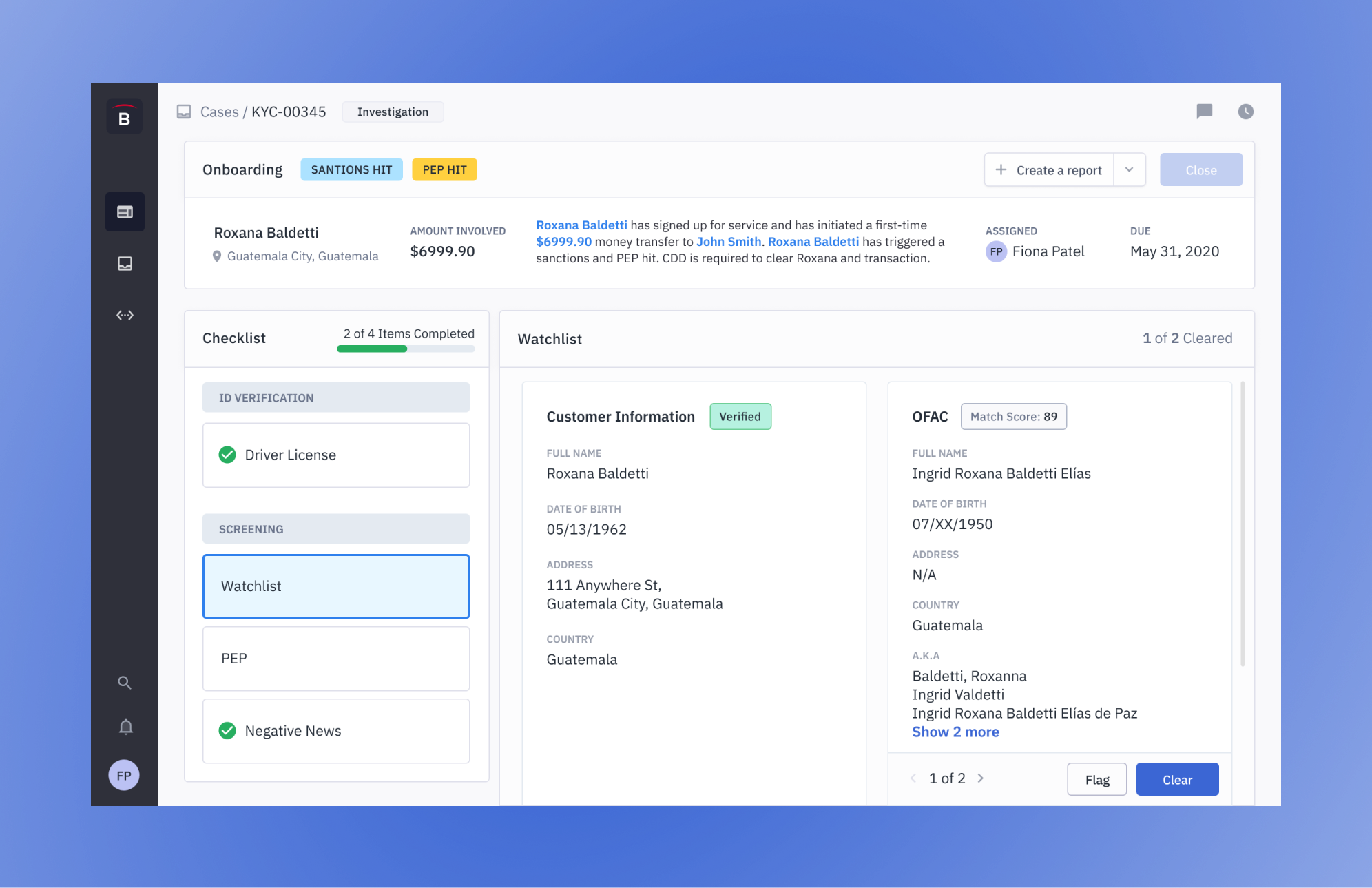
There’s a need to have easy and consistent access to customer information to cross-check their information with the various screening hits such as watchlists, PEP, and negative news.
For regulatory purposes, it is important to have the ability to add notes and attachments to either every item or at the case level. These should also be reflected in a timeline.
An analyst may go through hundreds of cases within a single day. Therefore, there are opportunities to streamline the process to minimize the number of clicks needed to close out a case and move onto the next one. One less click translates to hundreds of less clicks.
Final Mockups
New KYC Case Screen
ID/Document Verification
3rd party verification service verifies customer identity through various documents (driver license, passport, etc) provided by the customer.
3rd party verification service can automatically clear the appropriate checklist item if verification succeeds.
Analysts will also have the ability to manually upload documents to then be verified through 3rd party verification service.
Watchlist/Sanctions Screening
Analyst will manually flag/clear sanction hits individually.
Completing the Checklist
Once checklist is completed, depending on states of the checklist items, the analyst will be prompted to:
Report Created
Depending on the outcome of the checklist, a regulatory report may be required.
Once a report is created, it will appear as a list item.
Clicking the report list item will take them to the ‘Report Page’ for the analyst to fill out and file the report.
PEP Screening
PEP data on a customer is retrieved from a 3rd party service and all necessary information is laid our for the analyst to decide whether to flag or clear the customer of the PEP hit.
Outcome
We created a streamlined process which naturally leads the user towards what must be done to complete their investigations. To accomplish this we:
First, we used a checklist paradigm to help the user investigate all items required in order to move the case forward. This helps to provide a clear directive for the user.
Second, we’ve provided clear case actions and consequences depending on the decisions made on the checklist items through popups/modals.
Third, there will be onboarding cases for every customer. However, cases in which the customer can be automatically cleared of all checklist items will be auto-cleared. These will be saved within the system for ODD and spot-checking for QC.
Next Steps
This is an ongoing project and as we move towards shipping this new experience, we’ve come to realize during design review sessions with the engineering team that there are many threads to pull that relate to KYC cases. Some include:
Ongoing due diligence
TAPP detail enrichments
Handling multiple parties in one case.
How to represent different KYC cases, which may involve different designs.